Intelligent Process Automation vs Traditional Automation
Intelligent process automation handles the documents rule-based bots cannot.
Last Updated: 9 November 2026
Quick Summary
Intelligent process automation combines AI and machine learning with conventional automation, so software can interpret documents, classify inputs and escalate exceptions that rule-based bots cannot handle. Traditional automation follows fixed instructions and suits stable, high-volume, structured work. Choose intelligent process automation when documents vary and judgement is involved.
- Rule-based bots stop or process the wrong value when a document arrives in an unexpected format.
- Intelligent systems route unfamiliar items to a person with the relevant passages attached, then learn from the correction.
- Map the exceptions first: high deviation points to intelligent automation, near-zero deviation to a rule-based bot.
- Design the human-in-the-loop step before launch, with a named reviewer on the client side.
- Certant is designed to be white-labelled and resold, so partners keep implementation, support and integration revenue.
Table of Contents
- Intelligent Process Automation vs Traditional Automation: The Core Differences
- Side-by-Side Comparison: Rule-Based Bots vs Cognitive Automation
- How Intelligent Automation Handles Structured and Unstructured Data
- Practical Intelligent Process Automation Use Cases
- The Case for Moving Beyond Task Mimicry: Benefits and Trade-offs
- Implementing Intelligent Automation for Clients: A Practical Roadmap
- Choosing Your Automation Approach with Certant
- Frequently Asked Questions
Intelligent Process Automation vs Traditional Automation: The Core Differences
Intelligent process automation combines artificial intelligence and machine learning with conventional automation, letting software handle judgement calls that rule-based bots cannot (uipath.com). Traditional automation follows fixed instructions; intelligent process automation interprets, learns and escalates.
Traditional automation is a fast, cheap, reliable pair of hands. Intelligent process automation adds a brain, and costs more to build and govern.
UiPath's introduction to intelligent automation describes intelligent automation as software that incorporates AI and machine learning to automate complex workflows, and as an extension of traditional automation rather than a replacement for it.
What Traditional Automation and RPA Actually Do
Traditional automation, including robotic process automation, mimics the clicks and keystrokes a person would make. It reads a known field, moves data to a known place, and repeats.
Rule-based bots excel at high-volume, low-variance work: copying invoice numbers between systems, triggering an email when a form is submitted, reconciling two spreadsheets with identical column structures. They are cheap to test and easy to audit, because every step is written down.
The failure mode is equally predictable. The moment a document arrives in an unexpected format, a field is blank, or a supplier changes its invoice layout, the bot stops or processes the wrong value.
If you are still mapping out what rule-based automation covers in your own operation, our walkthrough on how to automate a business process covers assessment, software selection and the pitfalls that stall a first rollout.
Where Intelligent Process Automation Goes Further
Cognitive automation adds interpretation to the same workflow.
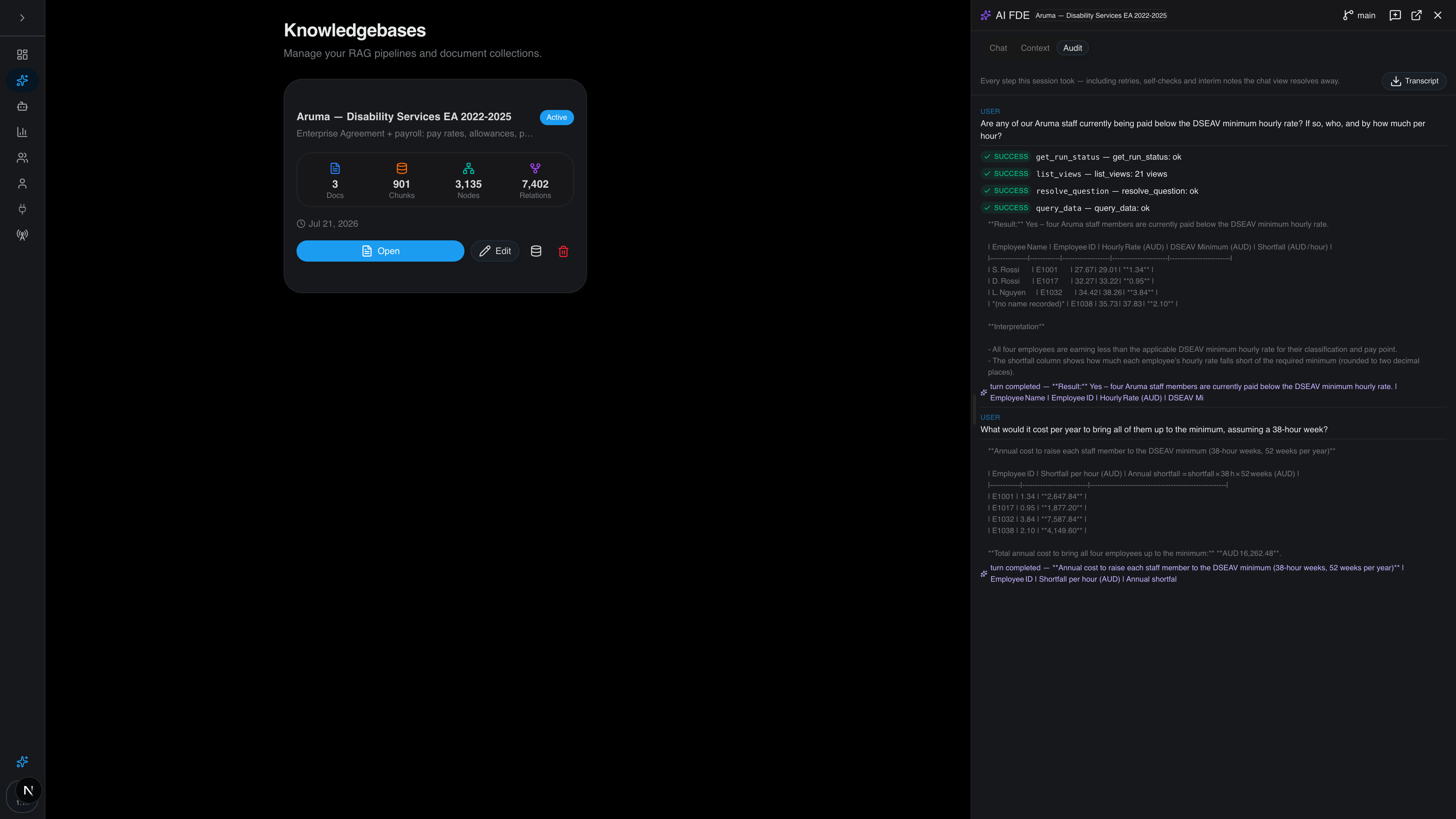
The practical difference is exception handling. A traditional bot throws an error when it meets something unfamiliar. An intelligent system can route that item to a person with the relevant passages attached, learn from the correction, and carry on.
The catch: intelligence needs grounding. A model that reads documents without a verified source of truth will produce confident, wrong answers. Our guide to giving AI agents current, cited knowledge shows how that works.
Side-by-Side Comparison: Rule-Based Bots vs Cognitive Automation
The table below summarises where each approach wins. Read it as a fit test, not a scorecard.
| Criterion | Traditional automation / RPA | Intelligent process automation |
|---|---|---|
| Input type | Structured data, fixed formats | Structured and unstructured data |
| Decision logic | Pre-programmed rules | Models that classify and infer |
| Exception handling | Stops, needs manual fix | Escalates with context, resumes |
| Setup effort | Lower, well understood | Higher, needs data and governance |
| Auditability | Step-by-step logs | Requires deliberate traceability |
| Best fit | Repetitive, stable, high-volume tasks | Variable, document-heavy, judgement work |
Neither column is universally better. A stable process with clean data does not need a model watching it, and adding one creates cost and risk for no gain. A document-heavy process where every case differs will break a rule-based bot within weeks.
How Intelligent Automation Handles Structured and Unstructured Data
Structured data lives in defined fields: database rows, spreadsheet columns, form entries. Unstructured data is everything else, and it is where most business knowledge actually sits.
Traditional automation needs structured input. Someone, or something, must extract the values first.
The harder problem is not extraction but agreement. When three systems hold different versions of the same policy, an AI that reads all three will give three answers.
Watch out: teams often skip this reconciliation step and go straight to a chatbot.
Practical Intelligent Process Automation Use Cases
The use cases that repay the investment share a pattern: high volume, genuine variation, and a cost attached to getting it wrong. Here is where we see intelligent process automation earn its place.
- Contract review and risk flagging. Incoming agreements are read, clauses compared against your standard positions, and risk flags raised automatically for a human to confirm.
- Policy and HR question answering. Staff ask in plain language and get an answer with the source paragraph cited, instead of emailing a colleague and waiting.
- Invoice and delegation checks. Items above an approval limit are stopped and routed to the right manager with the contract attached.
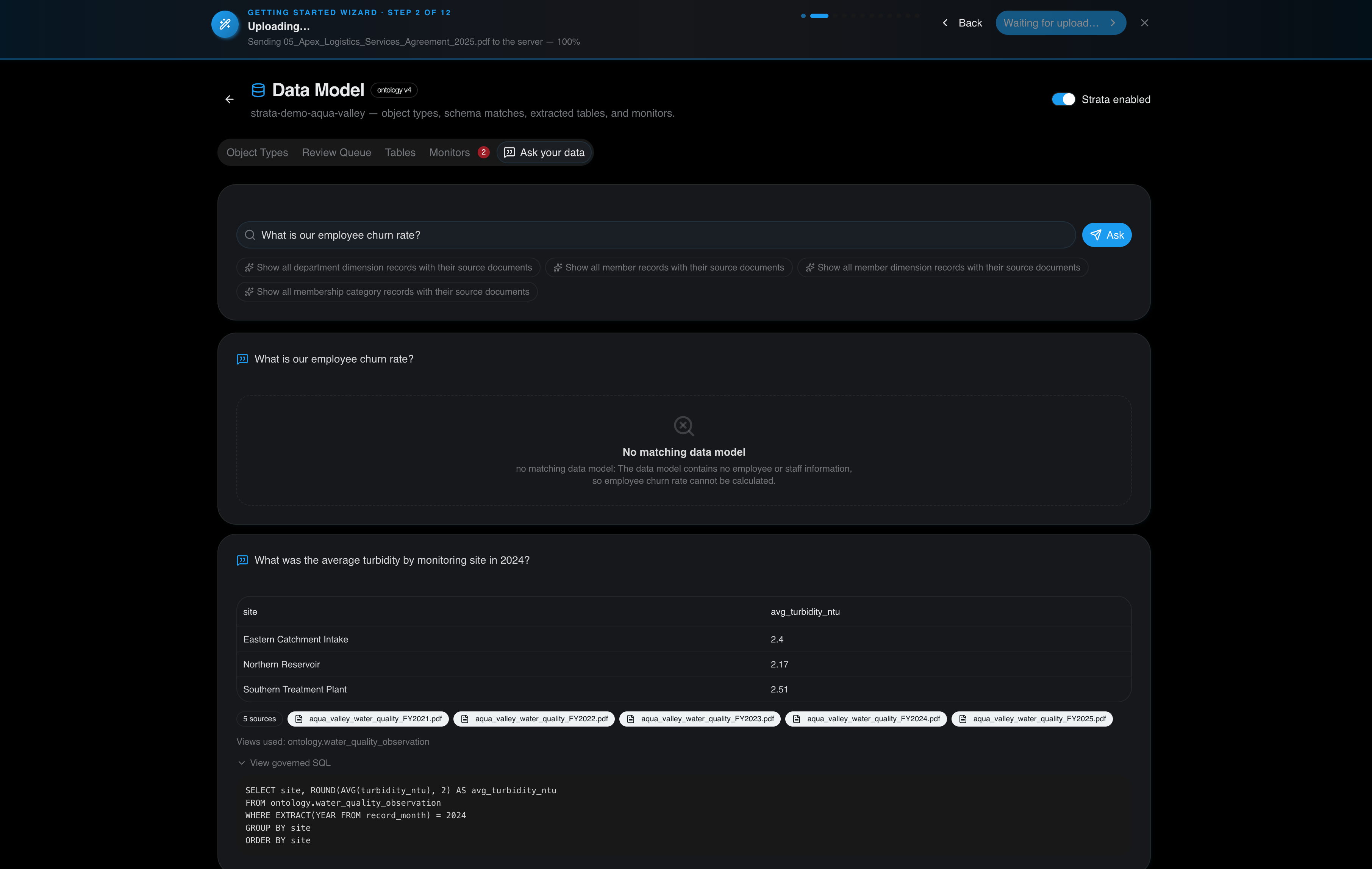
- Regulatory monitoring. Payroll exports and monitoring readings are checked as they land, so breaches surface before an auditor finds them.
- Tender and bid drafting. Old submissions are searched for prior answers, producing a first draft with sources attached.
One member organisation put a chatbot on its renewals page and now takes about half as many calls. Another customer had twelve years of monitoring readings trapped in PDF reports; the system now flags a missed month as it happens. Those are the kinds of gains that justify the build.
The Case for Moving Beyond Task Mimicry: Benefits and Trade-offs
The benefits are real but conditional. Operational efficiency improves when staff stop doing repetitive extraction and start handling exceptions. End-to-end automation becomes possible because the system can carry a case across systems rather than stopping at a boundary. Accuracy improves as corrections accumulate, provided someone captures those corrections rather than letting them disappear into a shared inbox.
The trade-offs deserve equal billing. Intelligent automation costs more to build, needs clean and governed data, and demands a human-in-the-loop design so people can review and override decisions. It also raises a question traditional bots never did: can you show your working?
The cost profile nobody puts in the table
A rule-based bot is cheap to build and cheap to change. You write the steps, test them, deploy them.
An intelligent system inverts that. The build is heavier because you are reconciling data sources, defining escalation paths and deciding what the model is allowed to decide.
A common pattern with agencies is to quote the build and forget the governance retainer. The client then discovers in month four that nobody owns the escalation rules, and the system drifts. Price the ongoing work in from the start.
Change management is the part that decides the project
Staff who were not shown how to correct the system will not trust it, and an untrusted system gets worked around. That is the single most common reason a technically sound rollout stalls.
The practical answer is to design the human-in-the-loop step before launch, not after. Decide who reviews, what they see on screen, and how their correction is captured and fed back.
Upskilling runs alongside that. The people who used to key in data become the people who handle exceptions and tune the rules.
Security and compliance profiles differ
A rule-based bot is deterministic. Given the same input it does the same thing, and an auditor can read the script and agree. Its security surface is the credentials it holds and the systems it touches.
An intelligent system introduces new surfaces: the model, the retrieval layer, the data it was grounded on, and the prompts that steer it.
The mitigation is architectural rather than procedural.
For agencies building this for clients, the white-label model matters here. Read how that works in showing auditors where each AI answer came from.
Implementing Intelligent Automation for Clients: A Practical Roadmap
Agencies and integrators get asked for this constantly, so here is the sequence we would follow. It is written for the person who has to deliver it to a client rather than the person writing the strategy deck.
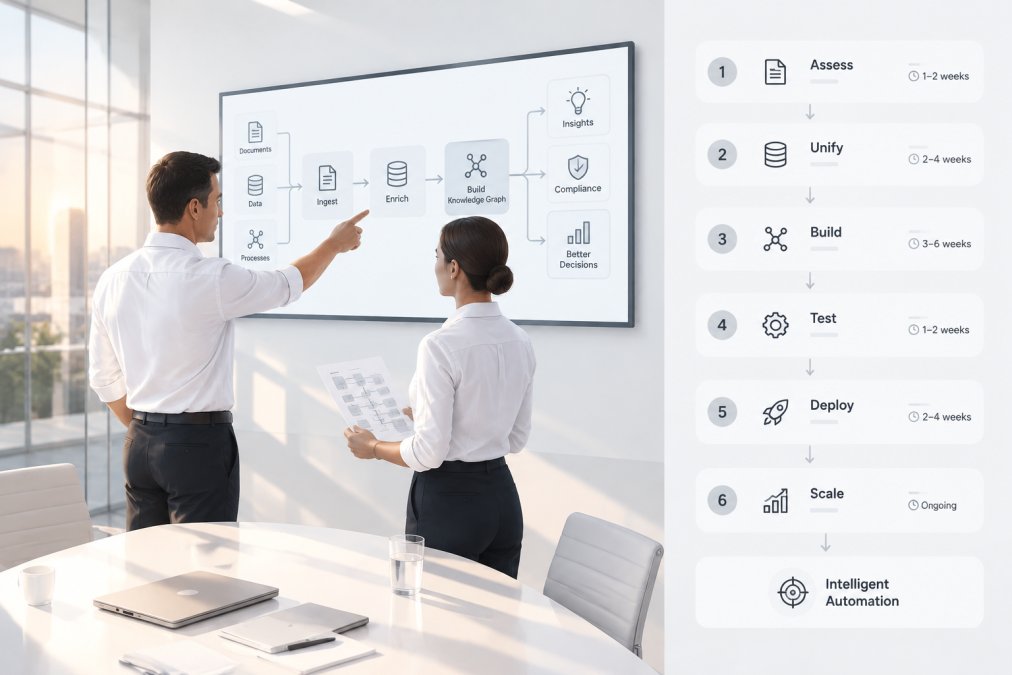
- Pick one process with real variation. Not the biggest, the messiest one that still has a clear owner and a measurable outcome. A process with no owner will not survive the first escalation.
- Map the exceptions first. Count how often the process deviates. High deviation points to intelligent automation; near-zero deviation points to a rule-based bot. Do this before you quote, not after.
- Reconcile the source documents. Identify every system holding a version of the truth and agree which one governs. This is where most projects quietly fail, and it is the step clients underestimate most.
- Build the smallest useful agent. One decision, one data source, one escalation path. Resist the urge to demo breadth before depth works.
- Design the human-in-the-loop step before launch. Decide who reviews, what they see, and how their correction is captured. Put a name against the reviewer role in the client's organisation.
- Log everything from day one. Questions, retrieved passages, agent steps and approvals. Retrofitting an audit trail is far harder than building one in.
- Measure, then extend. Add the next decision only once the first is stable, and only once the client can see the numbers that justify the next build.
Two things trip up client rollouts. The first is treating the AI as a drop-in replacement for an existing bot without revisiting the data underneath. Our seven-step guide to enterprise AI integration that reaches production goes deeper on the pilot-to-production gap.
The agency angle: build once, resell repeatedly
The roadmap above is the same for a single client, but the commercial model changes when you are an integrator delivering it across a book of clients.
That is the gap most implementation guides ignore. They assume an in-house team building for one organisation.
Certant is designed around that.
Watch out: the temptation with a repeatable platform is to skip the reconciliation step because the software makes it easy to start.
You can start in the cloud and move inside your own walls when a client's board or regulator requires it, without changing the product you have built around it.
Choosing Your Automation Approach with Certant
Choose traditional automation when the process is stable, the data is structured and the volume justifies the build.
Where Certant fits is the second case, particularly in regulated industries.
For agencies and integrators, the platform is designed to be white-labelled and resold, so partners can retain implementation, support and integration revenue while building a repeatable AI product.
The hard part of intelligent process automation was never the model. It is proving that the answer came from the right document, on the right day, with a person accountable for the call.
Frequently Asked Questions
Is RPA outdated compared with intelligent process automation?
Not outdated, but narrower in scope. Traditional RPA still suits high-volume, rule-based tasks where inputs are predictable, such as moving data between systems. Intelligent process automation adds machine learning, natural language processing and computer vision so it can handle unstructured documents and exceptions.
How does intelligent process automation handle unstructured data?
It reads it rather than requiring it to be pre-formatted. Cognitive technologies such as natural language processing and computer vision extract meaning from contracts, emails, scanned forms and free-text notes, then route that information into a workflow. Traditional automation typically needs structured data in fixed fields, so a human has to key in anything from a PDF first. A knowledge-graph approach takes this further by linking extracted facts to their source paragraphs, so every answer can be traced back to the document it came from.
Can intelligent process automation be integrated into existing legacy systems?
Yes, and that is often the point. Intelligent automation usually sits on top of existing systems rather than replacing them, reading from legacy databases, shared drives and case management platforms through APIs or screen-level integration. The practical question is how much of your data lives in unstructured formats that need extracting first. Mapping your sources before you start, and confirming which can be queried directly, keeps the integration scope realistic.
What are the main benefits of moving from rule-based to intelligent automation?
The clearest gains are handling exceptions without a person stepping in, processing document-heavy work that rule-based bots cannot touch, and scaling across process variants.
How do agencies build a repeatable intelligent automation offering for clients?
Start with a platform you can white-label and resell, so implementation, support and integration revenue stays with you rather than passing to the software vendor. Certant is designed for this model: partners can deploy it under their own brand and use drag-and-drop AI agents to automate client workflows. Beginning with one document-heavy process, such as contract risk flagging or policy Q&A, gives you a repeatable template you can adapt for the next client instead of rebuilding from scratch.