How to audit what an AI agent used to produce an answer
What an audit trail for AI answers has to hold (retrieved passages, document versions, tool calls and approvals) and how to prove where an answer came from.
To audit what an AI agent used to produce an answer, you need a record made at the time the answer was given, and it has to hold more than the answer. It needs the question, who asked it, which passages the agent retrieved and from which version of which document, every tool the agent called and what came back, which model and instructions were in use, and who approved any action it took. If any of those is missing, you can describe what the agent probably did, but you can't show it.
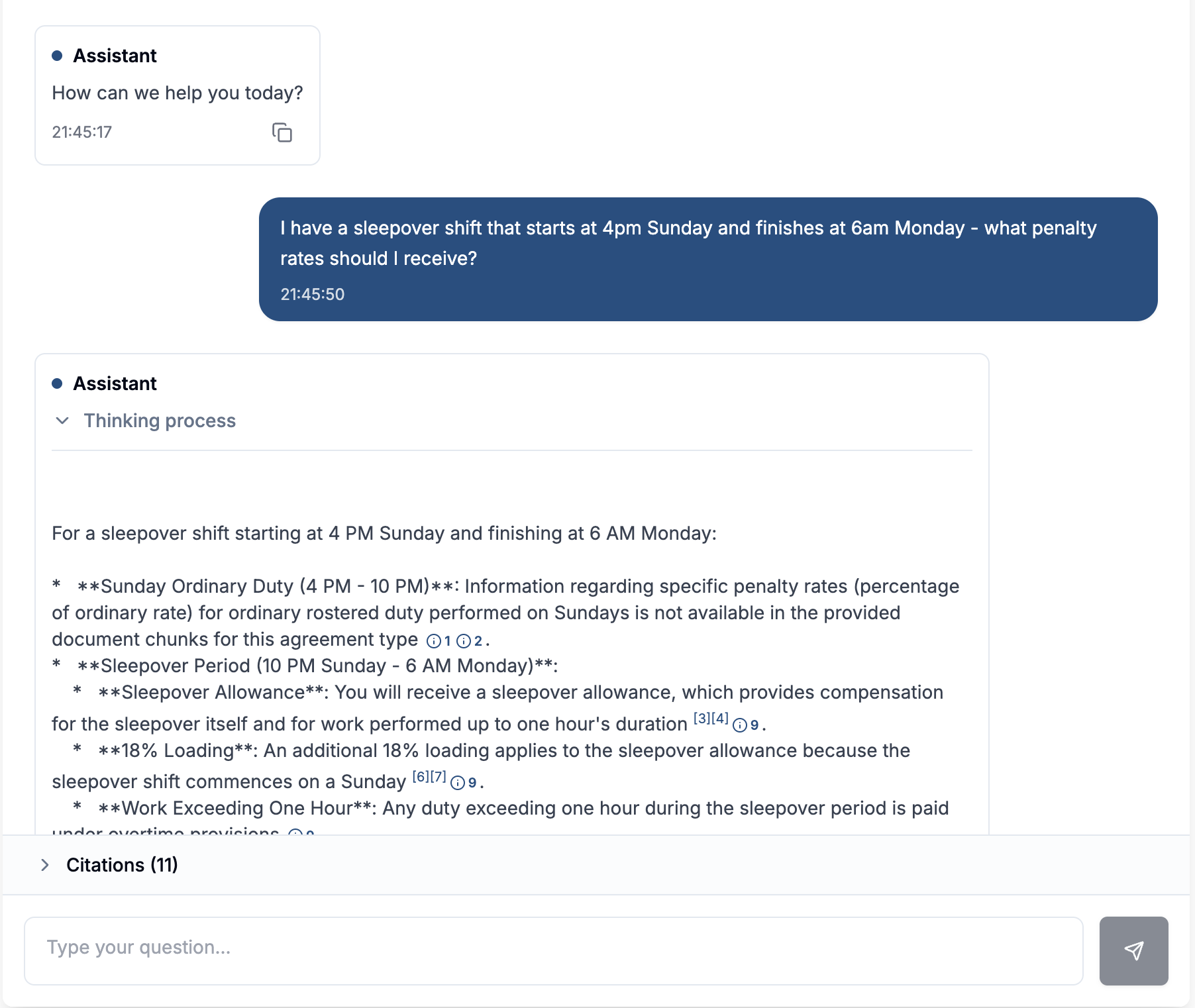
Most of the logging I see in AI pilots records the prompt and the final reply and nothing in between. That shows an answer was given and leaves out how the agent got there.
What the record needs to hold
I think of it as an evidence chain. Each link answers a question an auditor, a regulator or an unhappy customer will ask.
| What to record | The question it answers |
|---|---|
| The question, the person who asked it and the time | Who asked what, and when? |
| The permissions applied to that person | Was the agent allowed to show them this? |
| Each passage retrieved, with document name, version and location | What did the agent read before it answered? |
| Each tool call, with its inputs and its result | What did it look up or change in other systems? |
| The model, the instructions and the agent version | Would the same question get the same answer today? |
| Any approval, with who gave it and what they saw | Did a person agree to the action before it happened? |
| The final answer, with its citations | What exactly did the person receive? |
The document version is the item that's most often left out. A log that says the agent cited "Leave Policy, section 4" proves very little if that section was rewritten last month. You need to be able to open the text the agent read, as it read it.
Intermediate steps matter more than the final reply
An agent that runs several steps can go wrong at any of them. It might retrieve the right passage and then call a tool with the wrong customer ID. It might retry a failed lookup, get a different result and use that one. If you only keep the final reply, those steps are gone, and there's nothing left to show where a wrong answer went wrong.
So record every step, including retries and interim checks the user never saw. When something goes wrong, you need to know which step it went wrong at, and only a step-by-step record answers that.
The same applies to actions. If an agent changed a record, sent an email or updated a campaign, the log should show what it intended to do, the approval if one was needed, and what it actually did. When those three don't match, you've found your problem.
Make the log hard to change
A log that an administrator can edit is weak evidence. Write entries once and never update them; corrections go in as new entries. Store a digest of each entry's content so a later change shows up. If you already send security events to a SIEM, send these there as well, so the AI record sits with the rest of your evidence and is covered by the same retention and access rules.
Retention depends on your obligations. In the EU, the AI Act requires high-risk systems to record events automatically (Article 12) and requires providers to keep those logs for at least six months, unless other law sets a different period (Article 19). Financial services, health and government records rules often ask for longer. Base retention on the records rules for the decisions the agent supports, and use the longest period that applies.
How to prove where an answer came from
When someone challenges an answer, work through it in this order:
- Find the entry for that question using the person and the time.
- Open each cited passage in the version the agent read. Confirm it says what the answer says.
- Check the permissions. Could that person open those documents directly?
- Walk the tool calls in order. Check that each input came from an earlier step.
- If there was an action, compare the approved plan with what was executed.
- Re-run the question against today's documents and compare. If the answer has changed, the record tells you whether the documents, the model or the instructions changed.
If step 2 or step 4 fails, the agent made something up or used something it shouldn't have. If they pass, the problem is usually in the source material, and the fix belongs in the document.
Common gaps in AI audit trails
- Logging the prompt template but not the filled-in prompt. You can't see what the model was actually given.
- Logging retrieved chunks with no document version. You can't tell which edition was cited.
- Separate logs for chat and for agent actions. Nobody can join them up later, so you can't link an answer to the change it caused.
- Approvals recorded in email. The approval exists, but not next to the action it approved.
- Retention set by the vendor's default. A vendor's default can be shorter than your audit cycle.
What Certant records
Every Certant answer carries a citation that opens the source at the paragraph it came from. Behind that, an append-only audit log records every sign-in, query, agent run, document ingest and configuration change, with the person, the time and a digest of the content. Entries can't be changed once written. On Certant Cloud the log is kept for 365 days; on a sovereign deployment you set retention to your auditor's horizon. Logs stream to S3, Splunk, Datadog or any S3-compatible store.
The Agent Builder records every run, every step and every prompt. In a test run each step shows its input and output, and you can compare a run with the previous one. When an agent's action needs approval, it waits at the approval step, and approving it carries out exactly the plan the reviewer saw, without the agent planning it again.
The AI FDE has an Audit tab that shows every step a session took, including retries and self-checks that the chat view hides, and you can download the full transcript.
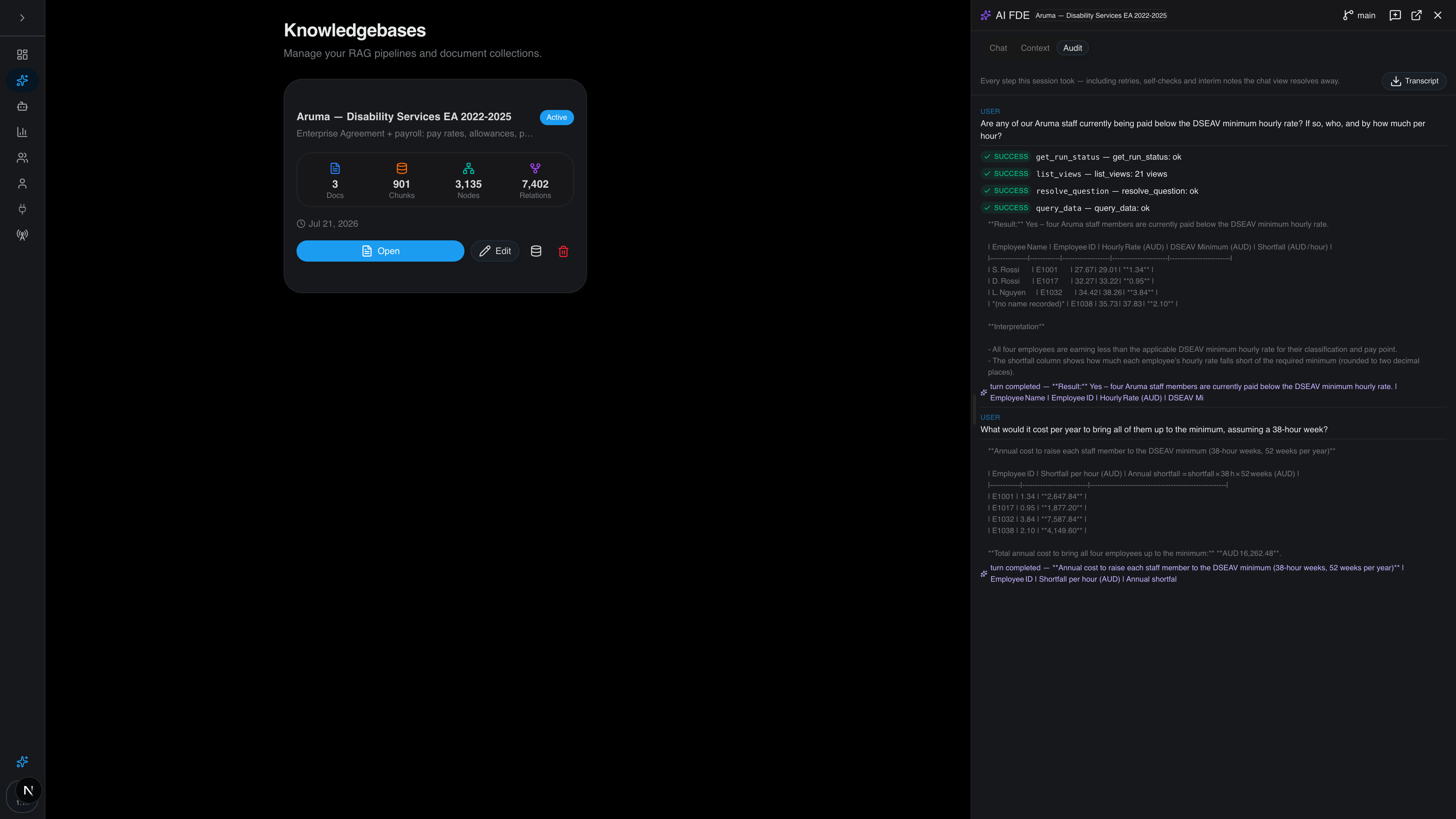
That gives a reviewer the question, what the agent looked up, what came back and what it said, in one place. Whether your obligations need six months of that or seven years, the retention setting is yours on a sovereign deployment. The security page has the detail, and the audit trail page shows what an entry holds.
Frequently asked questions
How do I audit what content an AI agent used to produce an answer?
Look up the record for that answer and open each retrieved passage in the document version the agent read. That only works if your system logged the retrieved passages with document versions, every tool call and the model and instructions in use, at the time the answer was given.
Can we audit every prompt, model response and agent decision?
Yes, if the system writes them to a log as they happen. Ask the vendor whether intermediate steps, retries and tool results are kept, whether entries can be edited, and how long they're kept.
How long should AI audit logs be kept?
At least as long as the records of the decisions the AI supports. The EU AI Act sets a minimum of six months for high-risk systems, and sector rules are often longer.
How do you show auditors an AI answer was reviewed and approved?
Keep the approval in the same record as the action: who approved it, when, and the exact plan they saw. Then show that what was executed matches that plan. If you want to see how this looks on your own documents, book a call or start with the free trial.