
Know before the auditor does
The numbers in your reports become live data. Strata tells you when one crosses a line, and waits for a person before it acts.
New data lands in your knowledge base. A rule read from your own documents catches a breach. An alert goes out with the evidence and a proposed fix, an approver signs off, and the audit record is written.
- New data lands In your knowledge base: a document, an export, a feed.
- Your rule catches it The limit is read from your own documents, not typed in.
- An alert with the evidence Who is affected, the source page, and a proposed fix.
- An approver signs off Never the person who asked. Nothing runs before this.
- The record is written Who asked, who approved, what ran. Permanent.
Two people below their legal minimum
Twenty dollars, and seventeen-fifty, against a floor of twenty-one thirty-four. That floor came from page 146 of a pay agreement nobody was ever going to read that far into.
Strata found it, flagged it, and can prove it, down to the page. You are not asked to trust a red flag: the minimum each person was checked against is in the row.
| Employee | Role | Rate | Compared against | Verdict |
|---|---|---|---|---|
| E1042 | DDSO level 2 | 20.00 | 21.34 | Breach |
| E1088 | DDSO level 2 | 17.50 | 21.34 | Breach |
| E1105 | Team leader | 31.10 | 32.05 | Fine |
| E1120 | Trainee | 22.80 | — | No data |
It builds the monitors itself
Strata starts in your knowledge base, not in a blank rules editor. It reads your own documents, finds where the limits are written, and writes the monitors for you to approve.
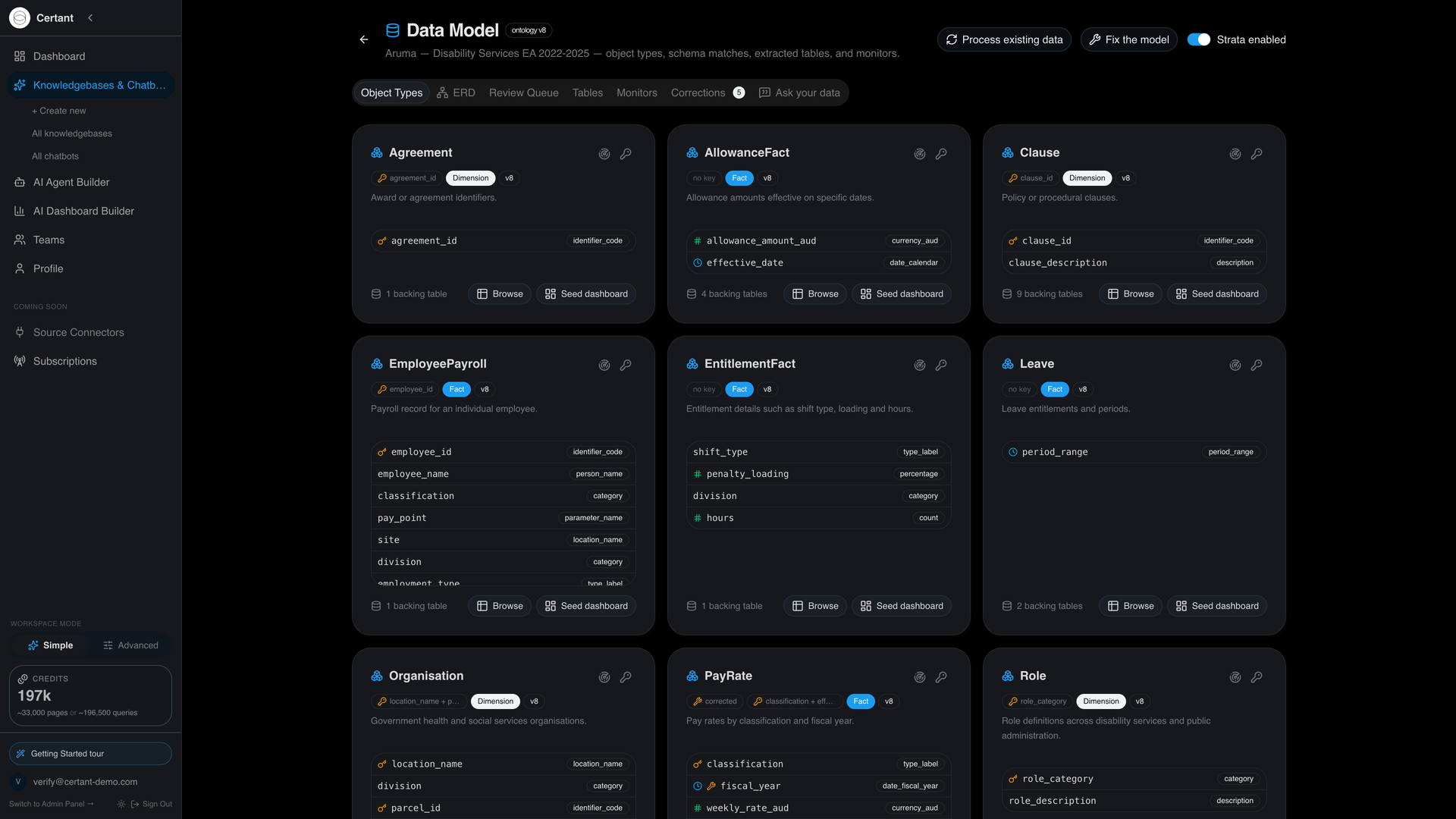
Example The model Strata built from two files: the published Aruma DSEAV 2022-2025 enterprise agreement, and a payroll export generated on its codes. Nine object types, typed columns, and the pay table's composite key.
Read the full run, including what went wrong
See it. Check it. Resolve it.
A rule with no number typed in
The limit is read from the agreement's own table, not typed by anyone. If page 146 changes, the check changes with it. Every row gets one of three answers: in breach, fine, or we don't have the data.
A machine that tells you when it doesn't know is a machine you can trust when it says it does.
Counted the way a database counts
Select an alert and Strata shows who is affected: one role, two employees, and the path it took to get there. Every row says where it came from, down to the page.
When a count can't be grounded in the data, the panel says so instead of estimating.
Pay rates › DDSO level 2 › A. Nguyen, M. Torres
Automates everything except accountability
An alert is resolved with an action you design once. Nothing it touches can happen until a person signs off, and the approver must be a different person from whoever asked.
What will run is frozen at sign-off, word for word. Who asked, who approved and what happened stay on a permanent record, and actions can be walked back.
Preview first shows what would happen without changing anything, anywhere.
Your model never changes behind your back
Payroll can stream its weekly export straight in, and each delivery is checked, deduplicated and kept on file. When a feed arrives in a shape Strata hasn't seen before, it waits for a person to review it.
Tell it once, in plain English, when a column means something only your people understand. The correction is kept in a ledger and replayed every time new documents arrive.
"In the salary schedules, the Year column means years of experience within the classification. It is not a fiscal year."
Ask for a figure
"The weekly rate for a DDSO 2 with four years' experience, from July 2023."
Plain English in. The answer comes from the table, and opens the agreement at the page.
Ask something it can't answer
"What is our employee churn rate?"
The model contains no staff turnover information. Nothing was estimated.
Questions outside the model are refused, not guessed. Gaps are shown, not filled.
Built for the numbers you report
Pay tables in agreements
Enterprise agreements are full of pay tables. Ask for the rate for a classification at a given experience level and date, and Strata answers from the table and opens the agreement at the page.
Readings locked in reports
Years of monitoring reports with the readings in tables. Strata pulls them into live data, watches the limits, flags months where a site didn't report, and traces every number to the report page.
Rosters, incidents, compliance
Rostering, incident and compliance tables become live data. A monitor flags a missing month or a value over a limit within minutes, and every figure traces back to the report it came from.
Returns, across years
Tables in annual reports and returns become data you can query across years and watch for gaps. A completeness monitor shows which sites or periods reported nothing, so you find the gap before the auditor does.
Returns and board packs
Figures in prudential returns, exposure reports and board packs become live data. A threshold monitor raises an alert within minutes of a breach landing, and the alert keeps a record of who decided what.
Leases, fees, settlements
Tables in leases, fee schedules, cost disclosures and settlement agreements become live data. Ask for every rent review date across a portfolio, or every liability cap across a set of contracts, with the page each came from.
Nothing has to leave the building
Certant Cloud
Live in minutes, pay for what you use. For teams that want to start today without waiting for IT.
Inside your own walls
Everything on this page can run on one machine inside the building. The agreement, the payroll export, your employees' names: none of it has to leave. You don't have to trade control for intelligence.
How it is governed
| Governed queries | Plain-English questions become read-only SQL over the model's views: select-only, joins follow stored link paths, never against raw tables. | Architecture |
| Source on every row | Every view carries its source table and source document. Provenance chips open the page; a joined figure is marked as not row-exact rather than over-claimed. | Architecture |
| Detection cadence | Every enabled monitor is checked on a five-minute sweep. An alert keeps a fingerprint of the breaching rows and fires again only when that set changes. | Changelog |
| Two-person actions | The approver must differ from the requester. The approved plan is frozen and replayed exactly; effects are logged step by step and can be compensated. | Security |
| Corrections ledger | Plain-English corrections go into an append-only ledger and replay on every rebuild. Undo is a new entry, never a deletion. | Architecture |
| The same loop | It is the loop Palantir Foundry sells: a model of the business, governed queries, monitors, gated actions. Here it assembles itself from the documents you already have and runs on one machine. | Book a demo |
You'll still get audited.
You'll just already know what they're going to find.
Two employees are paid below the DDSO level 2 minimum of 21.34. A fix is waiting for the payroll manager's approval.
See it. Check it. Resolve it.