
Agents that already know your business
Drag-and-drop workflows that read your documents, follow your rules, and call the tools you already use.
Drag sideways to see the whole diagram
-
Your data is the first node. Contracts, agreements and tickets.
-
It classifies, then routes. One step, a structured answer, branches that follow your rules.
-
It calls your tools, not ours. Salesforce, ServiceNow, Jira, GitHub, your own APIs.
-
The right people, the right channel. Slack, Teams, email, with the citation attached.
The builder as it ships
Drag from the library, connect on the canvas, configure inline and save.
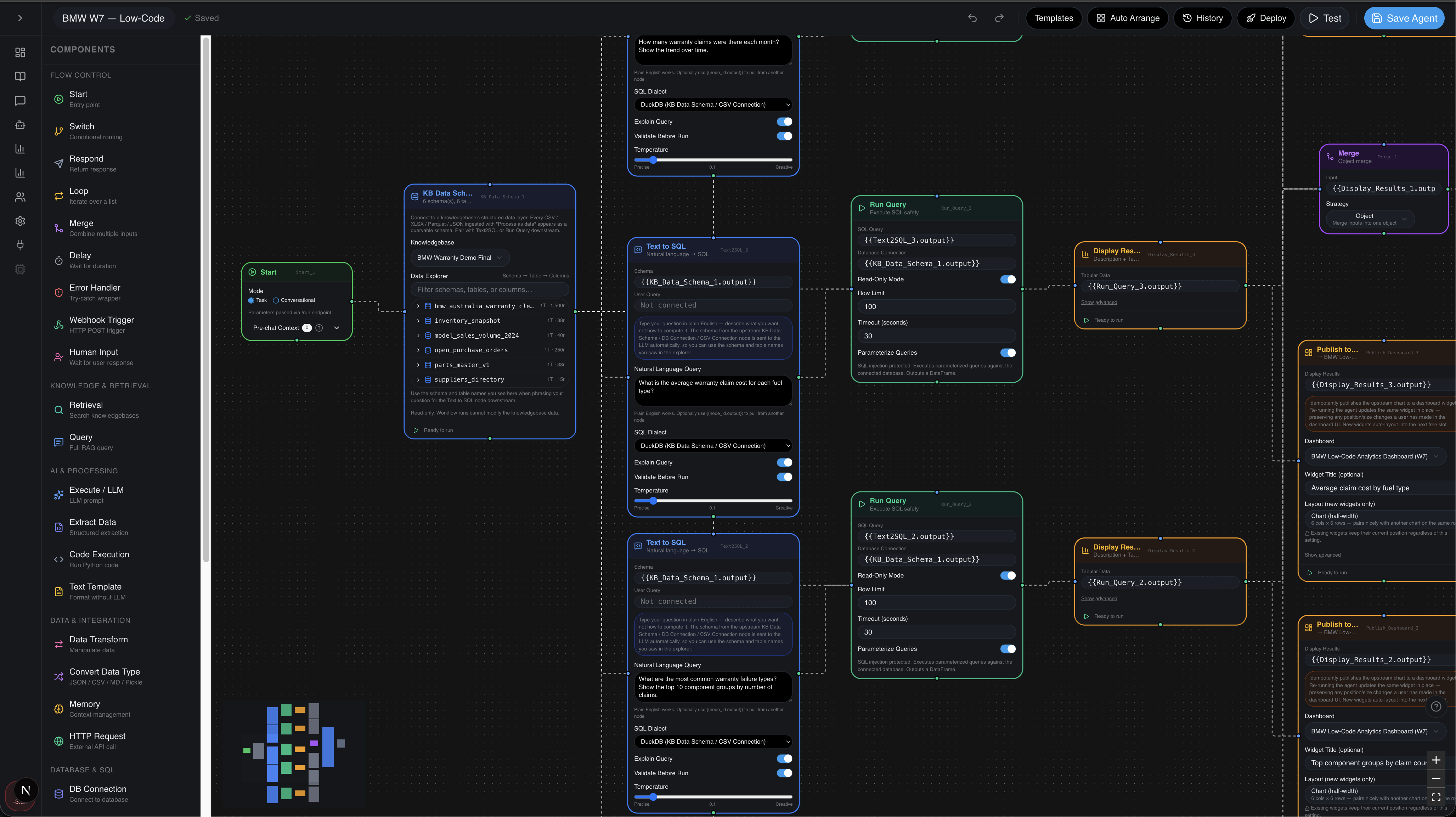
The library, the canvas and the node inspector in one view.
Thirty-one platform components in six colour-coded groups, plus nine connectors.
Pan, zoom, branch and merge.
Every node declares what it takes in and what it gives back, so bad wiring is caught before you run.
Every node's settings live on the node.
A live overview of the whole flow. Click anywhere to jump there.
Run the agent end to end against real or mocked inputs.
Versioned releases, instant rollback, and a webhook or CLI hook for every agent.
Most agent builders reach for your data last
Certant starts there.
Build it, code it, test it
Most of it is drag, connect, run.
Edge cases, anywhere in the flow.
Prove a step before it touches production.
What people build with it
Pick a job and see the whole flow.
Every component, one canvas
Thirty-one platform components and nine connectors.
Plus 3,000 more from the Certant MCP connector library.
Read the detail
Open a heading to read that part.
The longer versionWhat it does, in full
What it does, in full
Agents that already know your business
Your data is the first node. Contracts, agreements and tickets. The agent reads them before it acts.
It classifies, then routes. "Is this contract risky?" One step, a structured answer, branches that follow your rules.
It calls your tools, not ours. Salesforce, ServiceNow, Jira, GitHub, your own APIs. OAuth or a service account, your choice.
The right people, the right channel. Slack, Teams, email, with the citation attached so the reviewer can see why.
The builder as it ships
Drag from the library. Connect on the canvas. Configure inline. Hit save.
Library. Thirty-one platform components in six colour-coded groups, plus connectors for Xero, iMIS, SharePoint, Jira, Confluence, Obsidian, Notion, WordPress and Drupal. Drag any tile onto the canvas.
Canvas. Pan, zoom, branch and merge. Auto-tidy straightens a tangled flow, and the minimap shows where you are in a large agent.
Nodes and wires. Every node declares what it takes in and what it gives back, so bad wiring is caught before you run. Upstream values are referenced inline by node id.
Configuration. No pile of modals. Every node's settings live on the node: schema picker, prompt editor, dialect, temperature, validation.
Test. Run the agent end to end against real or mocked inputs. Every node shows its input, output and cost, and you can diff a run against the last one.
Deploy. Versioned releases, instant rollback, and a webhook or CLI hook for every agent. Same builder, your perimeter.
Most agent builders reach for your data last
Every agent starts with everything you have connected: contracts, policies, records. So instead of "fetch this row, send that email", the agent can decide: "is this contract risky? If it is, send it to the risk team and say why."
Code when you need it. UI when you don't.
What people build with it
Pick a job and see the whole flow: every branch, every sub-tool, every integration.
Every component, one canvas
Thirty-one platform components and nine connectors. Click a tile to see what it does and when to use it.
Ask Certant to build it
The AI FDE sits in a drawer on every screen. Describe the agent you want in plain English and it builds it, then waits for your approval before anything goes live.
TemplatesTemplates to start from
Templates to start from
Every agent starts from a template or a blank canvas; the builder follows your system theme.
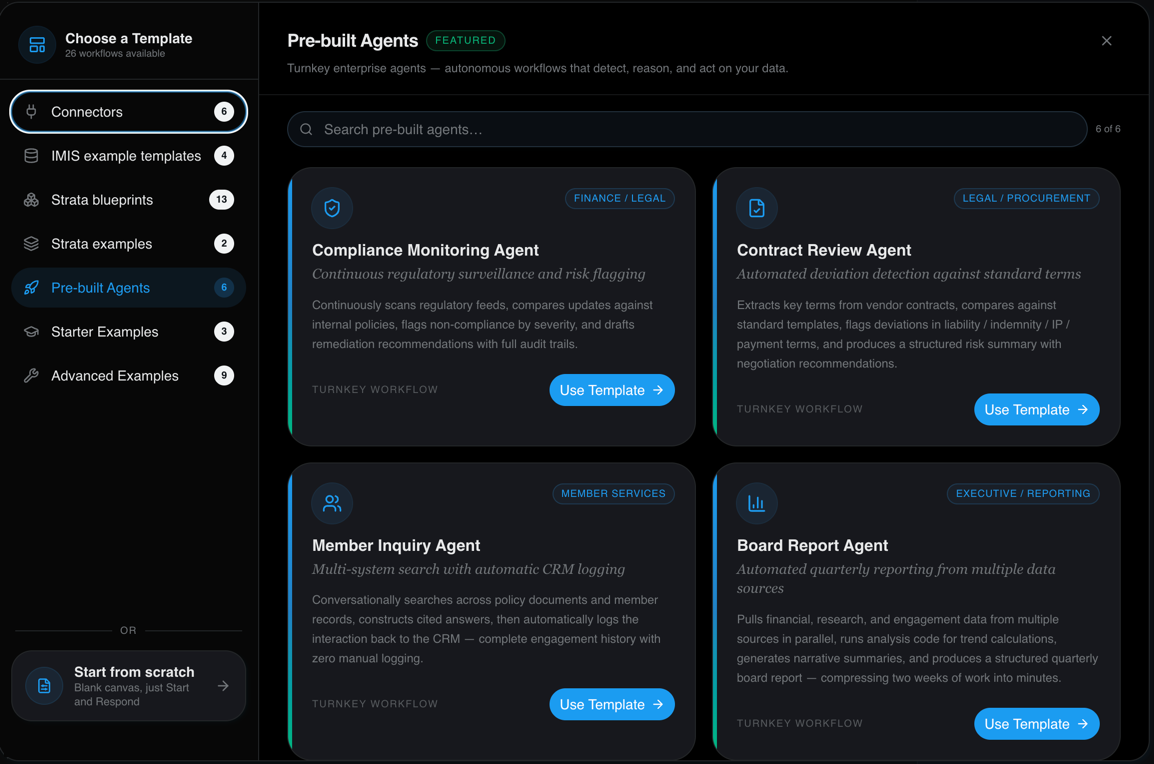
he template chooser: 26 workflows available.
What comes in, what the agent does, what goes out.
For the CIOHow it is governed
How it is governed
Pause the agent, ask a person, and resume exactly where it stopped.
SecurityEvery node takes JSON in and gives JSON back, so there are no surprise blobs to parse.
ArchitectureMCP serverGive your own agents what Certant knows
Give your own agents what Certant knows
Claude Code and other MCP clients can ask your knowledgebases, query your data and run your agents, under a key you issue.
Anything that changes live data waits for a person to approve it. The detail is under the headings below.
Which of our projects mention cyanobacteria? Then run the portfolio agent and tell me what changed.
set_knowledgebase
ask_knowledgebase
run_agent
get_agent_run
Fourteen projects mention cyanobacteria, the latest in 2022. The portfolio agent ran and added two new reports to the research dashboard.
Each tool call runs under the key Claude Code was given.
What your agent can do
Work from the agent you use
Your agent connects to Certant and gets tools for each part of the platform. It sees one group of tools at a time and switches group when the job changes, which keeps the list short enough to use well.
Questions come back answered from your documents, with the page each part came from.
ask_knowledgebasesearch_knowledgebasefind_textStrata turns the tables in your documents and feeds into data your agent can explore and query in plain English.
query_dataYour agent can lay out a workflow with the Agent Builder's nodes, test it, save it and run it.
test_runsave_workflowrun_agentMonitors check your data for thresholds and gaps and start the action you chose when one trips.
Upload documents, check how processing is going and run connector syncs on a schedule.
upload_documentget_ingest_statusrun_sync_nowBring your usage and credit balance into the conversation before a big job starts.
get_usageget_credit_balanceKeys and approvals
Decide what each agent may do
Every connection uses a key that a person issued, with scopes that say what it may touch. Anything that changes live data waits for a person to approve it.
Turn on the monitor "New report with no attachment" and email the library team when it trips.
Nothing changes in live data until someone presses Approve.
How the AI FDE fits in
The AI FDE uses the same tools
The AI FDE is the assistant inside Certant. It calls the same tools as the MCP server, from inside the platform, under a short-lived key that drafts changes and sends live ones for approval.
On a sovereign deployment the FDE runs on open models on your own GPUs, Qwen3.6 35B or GPT-OSS 120B. The assistant, its tools and your data all stay on your hardware, air-gapped if you need it.
Its model list is limited to open models you can host yourself, which keeps its work inside your environment.
Both clients pass the same key, scope and approval checks.
For your IT team
What your engineers will ask about
| Setting | Detail |
|---|---|
| Clients | Claude Code, Hermes, OpenClaw, NemoClaw and any other MCP client. |
| Transport | stdio, generally available, with one container per session. SSE in beta for remote agents. |
| Direction | Inbound only. Your agent connects in, and the server holds no OpenAI or Anthropic credentials. |
| Keys | Per-user keys, stored as a hash. Scopes cover workflow authoring, running and admin, read-only access, and Strata read, draft and commit. |
| Tool groups | Twelve modes: six for Strata and agent building, and six for knowledge, chatbots, agent operations, data sources, dashboards and account. The agent sees the current mode's tools unless you list them all. |
| Results | Every tool returns the same JSON shape: a summary, the data, and errors that each carry a hint for fixing the call. |
| Versioning | The server image is pinned to your platform release. |
| Extras | Workflow and Strata primers as MCP resources, and skill bundles that Claude Code loads directly. |
Questions
Before you connect an agent
Which plans include the MCP server?
The Business and Enterprise plans, and every dedicated and sovereign deployment. The Free trial, Starter and Pro plans use Certant through its own interface.
What does my agent's model provider see?
Your agent's provider sees what your agent asks Certant and what comes back, as with any other tool the agent uses. Give the key only the scopes and knowledgebases the job needs.
Can it all run inside our network?
The MCP server and the AI FDE can. On a sovereign deployment both run inside your network, and the FDE uses your own models. An outside agent such as Claude Code still needs its own connection to its model provider.
How do we connect Claude Code?
Create a scoped key under Settings, then add the Certant server to Claude Code's MCP configuration. The server runs as a container pinned to your platform version.
For developers: what a tool returns
{
  "ok": true,
  "tool": "ask_knowledgebase",
  "summary": "Answered from 3 documents",
  "errors": [],
  "data": {
    "answer": "Three projects measured blooms…",
    "citations": [
      { "document": "Project 1047 final report",
        "page": 31 }
    ]
  }
}
Bring a job you keep doing by hand.
Point an agent at it and watch what it reads before it acts.
Contract 2026-114 scored 4 of 5 for risk. It is with the risk team, and nothing has been sent to the vendor.