How often should you audit AI answers? A schedule and a sample size
Check every AI answer automatically, sample weekly, and audit whenever a source document or model changes. It also covers how many answers to sample when you can't read them all.
Check some of your AI answers every week, check all of them automatically, and run a full audit whenever something underneath the answers changes. A fixed calendar date matters less than you'd think. Most wrong answers appear right after a policy is replaced, a new batch of documents is loaded, or the model or prompt behind the assistant is swapped, and a quarterly review can sit two months after that.
That's the short version. The rest of this post sets out the schedule I'd use, how many answers to sample when there are too many to read, and what to do when a sample turns up a bad one.
Three layers of checking
Teams that ask "how often" usually picture one big review. It works better as three layers that run at different speeds.
| Layer | How often | What it catches |
|---|---|---|
| Automatic checks | Every answer, as it's given | Answers with no citation, citations that point at nothing, a jump in "I can't find that" replies, questions about topics you've marked as sensitive |
| Sampled review | Weekly for anything customer-facing or regulated, monthly for internal use | Answers that cite a real passage but get it wrong, answers that are right but out of date, tone problems |
| Full audit | When a trigger fires, and at least once a year | Systematic problems: a document read badly, a policy that was replaced but is still being cited, a permissions gap |
The automatic layer costs nothing once it's set up, so there's no reason to ration it. The sampled review is where people's time goes, and the full audit is the one your auditor or regulator will ask about.
The triggers that should start an audit
An audit on a fixed date misses the moment things break. These events should start one straight away:
- A source document is replaced or withdrawn, such as a new enterprise agreement, a revised product disclosure statement or an updated leave policy.
- A large batch of new documents is loaded, especially scans or anything with tables.
- The model, the prompt or the retrieval settings change. Vendors don't always announce a model change, so ask yours how they'll tell you.
- A complaint, a correction from a staff member, or a customer quoting an answer back at you.
- The assistant is opened to a new audience, for example moving from staff to members or customers.
The first trigger is the one teams miss. An assistant can keep citing the 2023 version of a policy for months after the 2025 version is published, and every citation will look correct, because the old paragraph really does say that.
How many answers to check when you can't read them all
If your assistant has produced 500 guides, or gives a few thousand answers a week, nobody is going to read all of them. You don't need to. A random sample tells you a lot, as long as it's actually random and you know what the numbers mean.
The rule of thumb statisticians call the "rule of three" is useful here: if you check n answers and find no errors, you can be about 95% confident the true error rate is below 3 divided by n. I worked the exact figures for a library of 500 items:
| Answers checked, all correct | What you can say about the 500 (95% confidence) |
|---|---|
| 30 | No more than about 9% are wrong |
| 60 | No more than about 4.4% are wrong |
| 100 | No more than about 2.6% are wrong, which is 13 items |
| 150 | No more than about 1.6% are wrong |
Read the other way round: if 2% of answers are wrong, a sample of 30 has less than an even chance of catching one, and a sample of 150 catches at least one about 95% of the time. So decide first what error rate you could live with, and size the sample to match. For most internal assistants, 60 a month is a sensible start. For anything a customer reads, or anything with money or entitlements in it, I'd start at 150.
Add a targeted sample on top of the random one. Pull every answer on your sensitive topics, every answer that cited a document changed in the last month, and the 20 most-asked questions. The random sample gives you an error rate you can report, and the targeted one checks the answers where a mistake would cost the most.
What a reviewer checks on each answer
Give reviewers the same short list so their results can be compared from month to month:
- Open the citation. Does the passage say what the answer says?
- Is that passage from the current version of the document?
- Did the answer leave out a condition or exception that the passage includes?
- If the documents don't cover the question, did the assistant say so?
- Should this person have been able to see the source at all?
Record a result for each answer: right, wrong, out of date, or correctly declined. The trend in those four counts is what you report. A reviewer who has to read a document from start to finish to check one answer will give up by the tenth, so if your tool only links to a whole file, the review won't last.
A note for marketing and brand teams
Some of the people asking how often to audit AI answers mean something different: they want to know what ChatGPT or Google's AI says about their company. That's a monitoring job across public assistants you don't control, and the tools for it are separate from anything I build. The method carries over, though. Keep a fixed list of questions, run it on a schedule (monthly is common), and keep a dated record of every answer so you can see when something changed.
If the worry is your own assistant giving out wrong prices or product claims, that's the audit this post is about, and you control the fix: correct or replace the source document and re-run the questions that cited it.
What Certant gives a reviewer
Every Certant answer carries a citation, and one click opens the source document at the paragraph it came from, so checking an answer takes seconds. There's more on that on checking AI answers against your approved sources. Certant also flags documents that contradict each other and documents that have been replaced, which covers the second check on the list. When the documents don't hold an answer, the chatbot says so and offers to pass the question to a person, and Certant keeps a list of the questions it couldn't answer. That list tells you which documents are missing.
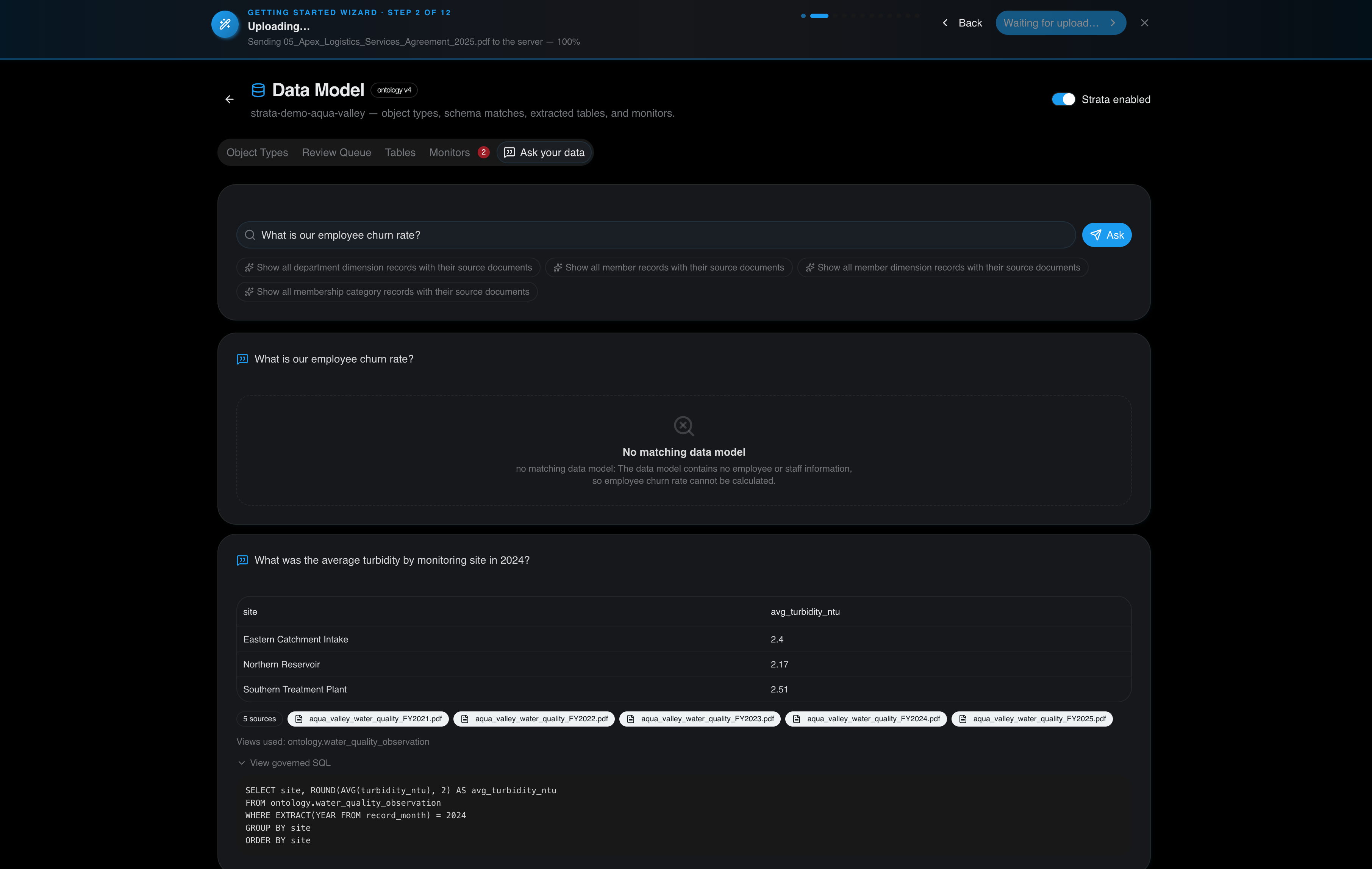
For numbers, Strata answers from the tables inside your documents with SQL you can open, and lists the source files beside the result. If the data isn't there, Strata shows a "No matching data model" card and doesn't answer.
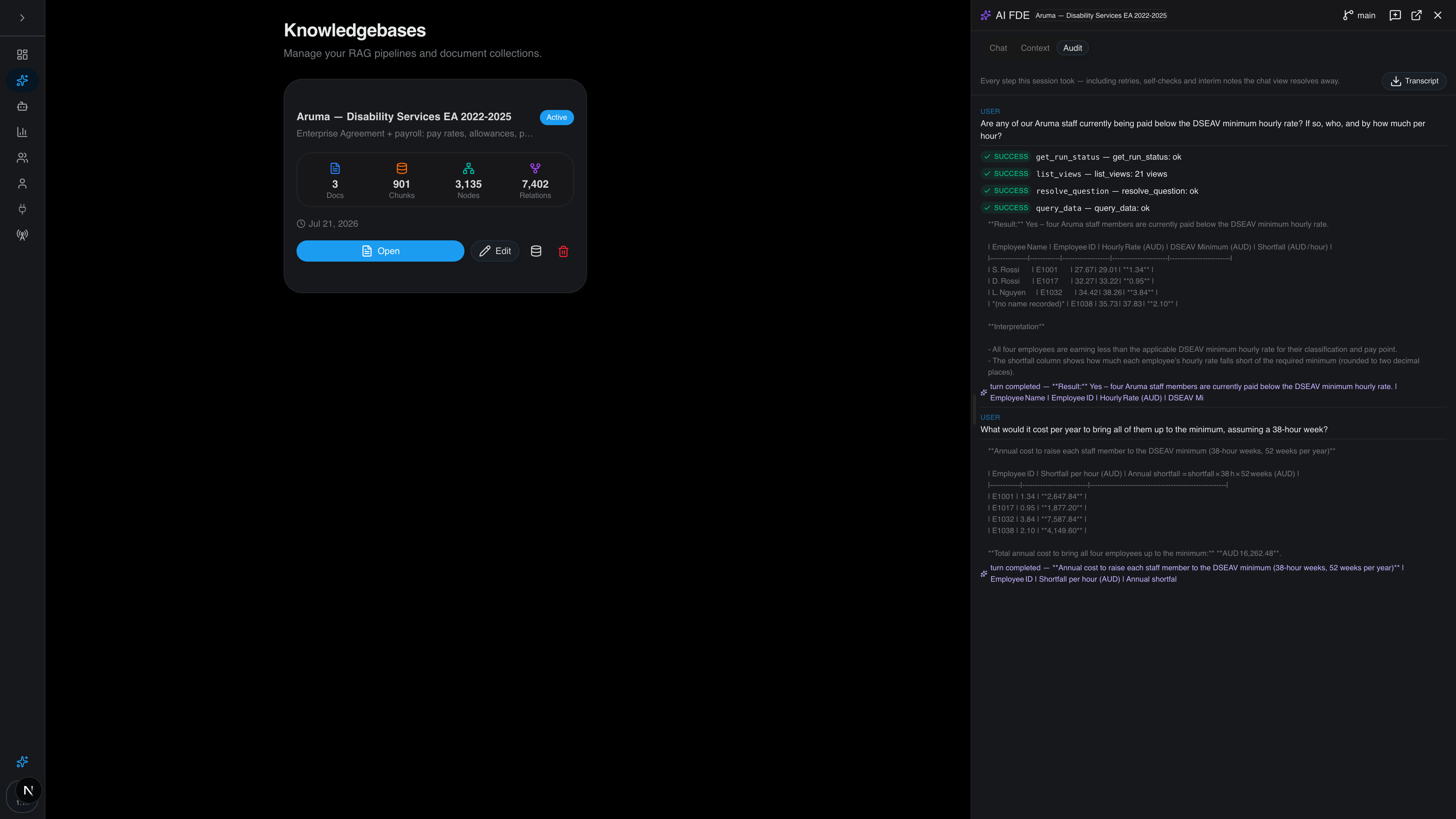
Every query, agent run, document ingest and configuration change goes into an append-only audit log with the person, the time and a digest of the content. On Certant Cloud the log is kept for 365 days, and on a sovereign deployment you set the retention yourself. That log is where your sample comes from. I've written separately about what an audit trail for AI answers should hold.
When a sample finds a wrong answer
Don't just fix that one answer. Work out which of these caused it, because each one has a different fix and the first two usually affect many other answers too:
- The document was read badly. A table row was dropped or a scan was misread. Re-process the document and re-run every question that cited it.
- The source is out of date or wrong. Replace or correct the document. Everything that cited the old version needs checking.
- The answer drifted from a correct source. The passage was right and the summary wasn't. Note the question type and add it to next month's targeted sample.
- It answered when it should have declined. This is the most serious result in a regulated setting. Find out what was retrieved, and tighten the setting that decides when the assistant answers.
Then increase the sample for the next round. One wrong answer in 60 puts the true rate anywhere between almost nothing and about 9%, so you need more data before you quote a figure like 1.7%.
Frequently asked questions
How often should AI answers be audited for accuracy and compliance?
Check every answer automatically for a citation, sample answers weekly if customers or regulated decisions depend on them (monthly for internal use), and run a full audit whenever a source document, the model or the audience changes, and at least once a year.
How do you spot-check hundreds of AI-generated answers without reading every one?
Take a random sample and add a targeted one. If 100 randomly chosen items out of 500 are all correct, you can be about 95% confident no more than 13 of the 500 are wrong. Add every answer on sensitive topics and every answer that cited a recently changed document.
What should trigger an unscheduled AI audit?
A replaced or withdrawn source document, a large new batch of documents, a change of model, prompt or retrieval settings, a complaint or correction, and opening the assistant to a new audience.
Can you run this audit on Certant?
Yes. Citations open at the paragraph, the audit log records every query, and Certant keeps a list of questions it couldn't answer. You can try it with the free trial, or book a call if you need to plan an audit for a regulated deployment.