How to Audit AI Knowledge Graphs: A Step-by-Step Guide
Learn how to audit AI knowledge graphs effectively. Step-by-step process to verify accuracy, identify gaps, and ensure reliable answers in your system.
Table of Contents
- Why Auditing Your AI Knowledge Graph Matters
- What You'll Need Before Starting an Audit
- Step 1: Map Your Data Sources and Coverage
- Step 2: Test Verifiable AI Answers Against Source Documents
- Step 3: Evaluate Knowledge Graph RAG Performance
- Step 4: Measure Knowledge Graph Quality Metrics
- Step 5: Run Automated Knowledge Graph Testing
- Common Issues Found During Knowledge Graph Audits
- Maintaining Your Audited Knowledge Graph
- Frequently Asked Questions
Last Updated: October 4, 2026
Why Auditing Your AI Knowledge Graph Matters
An AI knowledge graph sits at the heart of how organisations answer questions, which is why you need to audit AI knowledge graphs properly. It pulls together documents, data, and processes into one searchable system. But if the graph contains errors, contradictions, or gaps, the answers it gives will be wrong too. Ensuring the integrity of these connections is essential to prevent the propagation of flawed AI search data throughout your enterprise systems.
Auditing an AI knowledge graph means checking whether it actually delivers what it promises. Does it find the right source documents? Do the answers it generates match what's actually written in those sources? Can you trace each answer back to a specific paragraph?
This matters because bad answers cost time and money. A compliance officer gets a wrong answer about contract terms. A new hire receives incorrect policy information. A customer service team gives guidance that contradicts what's in the manual. Each mistake erodes trust in the system and in the organisation.
The gap between a working prototype and a working system is where auditing happens. Without it, you're flying blind.
The steps in this guide will help you find those gaps before they cause problems.
What You'll Need Before Starting an Audit
Before you start auditing your knowledge graph, gather the right tools and people.
You'll need:
- Access to your source documents (the files the knowledge graph pulls from)
- A way to run test queries against the graph
- The ability to see which source documents the system returned
- Someone who knows the business rules and policies
- Someone who understands how the graph was built
The business expert matters most. They know what the right answer should be. They can spot when the graph returns something technically accurate but contextually wrong.
You also need a test environment. Never audit against your live system. Create a copy of your knowledge graph in a staging area where you can run experiments without affecting real users.
Document what you're testing as you go. Keep a simple spreadsheet with the test query, the expected answer, what the graph actually returned, and whether it passed or failed.
Step 1: Map Your Data Sources and Coverage
Start by understanding what your knowledge graph actually contains.
List every source the graph pulls from. This might be SharePoint folders, a document management system, a database, or files stored in the cloud. Write down the name, type, and what kind of information each source holds.
Then check the coverage. Does the graph include all the documents you think it does? Are there entire folders or systems it's missing?
Common gaps appear here:
- Old versions of documents still in the system alongside new ones
- Documents stored in places the graph wasn't configured to reach
- Unstructured data like email archives or chat logs that nobody indexed
- Sensitive documents excluded from the graph but referenced in policies

Once you know what's in the graph, test whether it actually finds things from each source. Query for a fact you know appears in one source. Did the graph return it? If not, that source might not be connected properly.
This step takes time but saves you later, and it's essential before you audit AI knowledge graphs in earnest. You can't audit what you don't understand.
Step 2: Test Verifiable AI Answers Against Source Documents
This is where you check whether the graph's answers match reality.
Pick a set of test questions. Choose ones with clear, factual answers that appear directly in your source documents. Avoid questions that require interpretation or synthesis across multiple documents. Start simple.
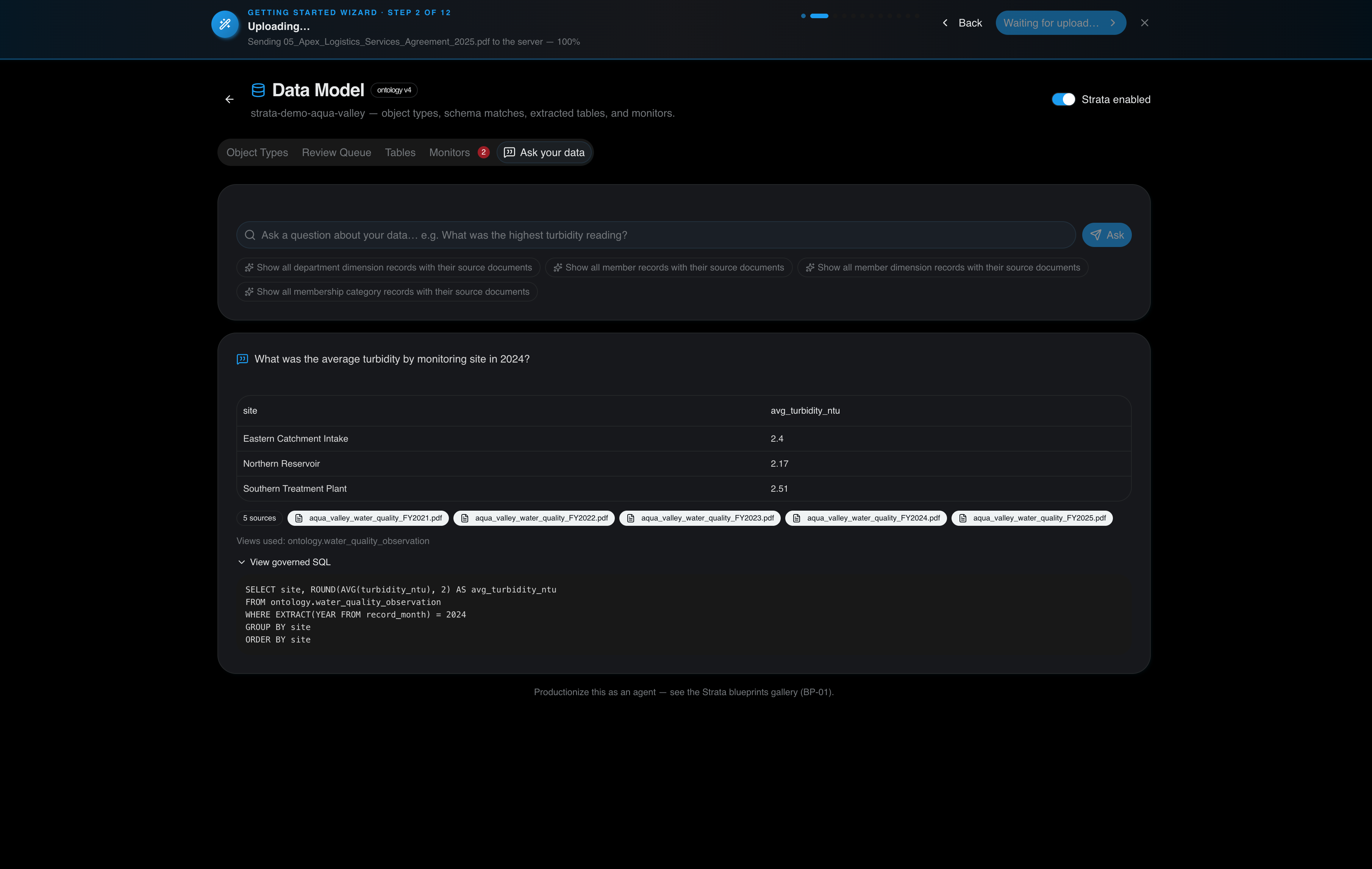
Run each question through your knowledge graph. Write down the answer it gives and which source documents it cites.
Then open those source documents and check. Does the answer actually appear there? Is it accurate? Is it complete?
Many systems will cite a document but misquote it or pull the wrong section. You're looking for that gap.
Test these types of questions:
- Specific policy details (e.g., "What is the approval limit for expenses under £500?")
- Definitions from your documents (e.g., "What does 'material risk' mean in our contract terms?")
- Process steps (e.g., "What happens in step 3 of the onboarding process?")
- Dates and deadlines (e.g., "When does the annual review cycle start?")
For each test, mark whether the answer was correct, partially correct, or wrong. Track which types of questions fail most often. That pattern tells you where the graph needs work.
Step 3: Evaluate Knowledge Graph RAG Performance
RAG stands for Retrieval-Augmented Generation (Enhancing medical AI with retrieval-augmented generation: A mini narrative review). It's how the graph finds relevant documents and uses them to build answers.
To evaluate knowledge graph RAG performance, test whether the system retrieves the right source documents when you ask a question.
Ask a query and look at the documents the graph returned. Are they relevant? Do they actually contain information about your question? Or did it pull back unrelated material?
Run tests like this:
- Ask a specific question and check the top 5 results
- Count how many of those results actually contain relevant information
- Note which queries returned irrelevant documents
- Look for patterns (e.g., does it struggle with certain topics or document types?)
A good knowledge graph RAG system retrieves mostly relevant documents. A weak one wastes time pulling back noise.
If you see poor retrieval, the problem usually sits in one of these areas:
- The documents aren't indexed properly
- The graph doesn't understand the language in your documents
- The question is too vague or uses different terminology than the source material
- The graph was trained on too little data
Document what you find. This tells you whether you need to improve the indexing, add more training data, or rewrite how questions are being interpreted.
Step 4: Measure Knowledge Graph Quality Metrics
Create a scorecard to track how well your knowledge graph performs.
The key metrics are:
Accuracy - Does the answer match the source document? Test 50 questions and count how many answers are correct.
Build a brain for your business →
Coverage - How many questions can the graph answer? Test a range of queries across different topics and document types. Count the percentage that return a useful answer.
Citation quality - When the graph cites a source, is the citation accurate? Check 20 answers and verify each source document actually supports the answer.
Retrieval precision - Of the documents the graph returns, how many are actually relevant? Divide relevant results by total results returned.
Response time - How long does it take to get an answer? Measure in seconds for typical queries.
Track these metrics over time. They show whether your graph is improving or degrading.
| Metric | Target | How to Measure | Frequency |
|---|---|---|---|
| Accuracy | 95%+ | Test 50 queries, count correct answers | Weekly |
| Coverage | 85%+ | Test 100 queries, count useful responses | Weekly |
| Citation accuracy | 98%+ | Verify 20 cited sources | Bi-weekly |
| Retrieval precision | 80%+ | Check relevance of top 5 results per query | Weekly |
| Response time | Under 3 seconds | Time 20 typical queries | Monthly |
When a metric drops, investigate why. Did the source documents change? Was the graph updated? Did someone add new data that threw off the indexing?
Step 5: Run Automated Knowledge Graph Testing
Manual testing catches some problems. Automated testing catches the rest.
Set up tests that run continuously against your knowledge graph. These tests should:
- Run the same queries every day and flag if answers change unexpectedly
- Check whether cited sources still exist and haven't been deleted
- Verify that new documents added to the system are being indexed
- Test edge cases (very long queries, queries with special characters, etc.)
- Monitor response times and alert if they degrade
Many organisations build these tests in-house using simple scripts. Others use monitoring tools designed for this purpose. Automatic AI Powered Analytics can help track these metrics continuously, flagging anomalies before they affect users.
Automated testing matters because humans can't test everything. A query that worked yesterday might fail today if someone updated a source document. Automated tests catch that immediately.
Start with a small set of core tests. Run them daily. Add more tests as you find gaps.
Document what each test checks and why. When a test fails, have a process to investigate and fix the underlying issue.
Common Issues Found During Knowledge Graph Audits
When you audit knowledge graphs, certain problems show up repeatedly.
Duplicate or conflicting information - The same topic appears in multiple source documents with different answers. The graph doesn't know which one to trust, so it returns contradictory information.
Outdated documents - Old versions of policies or procedures are still in the system. The graph pulls from the old version instead of the current one.
Missing context - The graph returns a technically correct answer but leaves out important context. A policy might say "approval required" but not mention that certain roles are exempt.
Broken links to sources - The graph cites a source document that's been deleted or moved. Users can't verify the answer.
Inconsistent terminology - Your documents use different words for the same concept. The graph doesn't connect them, so it misses relevant information.
Incomplete indexing - New documents added to the source systems aren't being picked up by the graph. Users get outdated answers.
Poor handling of negation - The graph struggles with "not" and "except". It might return information about what's prohibited when you asked what's allowed.
When you find these issues, fix the source. Clean up duplicate documents. Remove outdated versions. Add context to confusing policies. Update the graph's indexing rules.
Maintaining Your Audited Knowledge Graph
Auditing isn't a one-time event. Knowledge graphs degrade over time as source documents change.
Set up a maintenance schedule:
- Weekly - Run automated tests and check for alerts
- Monthly - Run a sample of manual tests to catch issues automated tests miss
- Quarterly - Review the quality metrics and look for trends
- Annually - Do a full audit like the one described in this guide
When source documents change, update the knowledge graph. When new documents are added, make sure they're indexed properly. When users report bad answers, investigate and fix the underlying cause.
Many organisations assign one person to own knowledge graph maintenance. That person runs the tests, investigates failures, and coordinates fixes with the teams that manage source documents. Tools like Intelligent Chatbots can help surface user feedback about answer quality, making it easier to spot problems early.
The effort pays off. A well-maintained knowledge graph stays accurate and useful. A neglected one becomes a liability.
Auditing your knowledge graph takes effort, but the payoff is clear: accurate answers that your team can trust. When staff and customers get reliable information, they stop emailing you for clarification. They stop making mistakes based on wrong guidance. The system actually saves time instead of creating more work.
At Certant, we help organisations build knowledge graphs that stay accurate. Our platform tracks which source documents feed the graph, shows exactly which paragraph each answer comes from, and flags when something changes. That transparency makes auditing easier and faster. Start free to see how it works with your own documents.
Frequently Asked Questions
What are the key metrics for auditing a knowledge graph?
The main metrics include accuracy (whether answers match source documents), completeness (coverage across all data sources), citation quality (whether sources are correctly linked), and response consistency (whether the system gives the same answer to the same question repeatedly). You should also track how often the system returns no answer when it should have one, and how frequently users report incorrect or incomplete responses. These metrics tell you whether your knowledge graph is trustworthy enough for your organisation's needs.
How do you verify the accuracy of AI-generated knowledge graphs?
Test verifiable AI answers by comparing them directly against the source documents. Ask the system a question, note which documents it cites, then manually check whether those citations actually support the answer. Run this test across different question types: compliance queries, policy lookups, and operational questions. Document any mismatches. A good knowledge graph audit includes spot-checking at least 50-100 answers across different topics to catch systematic errors in how the system retrieves or interprets information.
Why is auditing essential for RAG-based knowledge systems?
RAG (retrieval-augmented generation) systems combine document retrieval with AI generation, which creates two places where errors can occur: the retrieval step might pull the wrong documents, or the generation step might misinterpret them. Without auditing, you won't know which is happening. Auditing reveals whether your knowledge graph RAG is pulling from the right sources, ranking them correctly, and using them accurately. This is critical in regulated industries where an incorrect answer can trigger compliance violations or operational failures.
What happens if we find problems during the audit?
Most issues fall into a few categories: missing documents (you haven't connected all your data sources yet), incorrect metadata (documents are tagged wrong, so retrieval pulls the wrong ones), or interpretation errors (the system misreads what a document says). Once identified, you can fix them by adding missing sources, correcting document tags, or adjusting how the system weights information. The audit process itself shows you exactly where to focus your effort rather than guessing at what might be wrong.
Frequently asked questions
What are the key metrics for auditing a knowledge graph?
The main metrics include accuracy (whether answers match source documents), completeness (coverage across all data sources), citation quality (whether sources are correctly linked), and response consistency (whether the system gives the same answer to the same question repeatedly). You should also track how often the system returns no answer when it should have one, and how frequently users report incorrect or incomplete responses. These metrics tell you whether your knowledge graph is trustworthy enough for your organisation's needs.
How do you verify the accuracy of AI-generated knowledge graphs?
Test verifiable AI answers by comparing them directly against the source documents. Ask the system a question, note which documents it cites, then manually check whether those citations actually support the answer. Run this test across different question types: compliance queries, policy lookups, and operational questions. Document any mismatches. A good knowledge graph audit includes spot-checking at least 50-100 answers across different topics to catch systematic errors in how the system retrieves or interprets information.
Why is auditing essential for RAG-based knowledge systems?
RAG (retrieval-augmented generation) systems combine document retrieval with AI generation, which creates two places where errors can occur: the retrieval step might pull the wrong documents, or the generation step might misinterpret them. Without auditing, you won't know which is happening. Auditing reveals whether your knowledge graph RAG is pulling from the right sources, ranking them correctly, and using them accurately. This is critical in regulated industries where an incorrect answer can trigger compliance violations or operational failures.
What happens if we find problems during the audit?
Most issues fall into a few categories: missing documents (you haven't connected all your data sources yet), incorrect metadata (documents are tagged wrong, so retrieval pulls the wrong ones), or interpretation errors (the system misreads what a document says). Once identified, you can fix them by adding missing sources, correcting document tags, or adjusting how the system weights information. The audit process itself shows you exactly where to focus your effort rather than guessing at what might be wrong.